Send an email from a Microsoft 365 alias
I simply wanted to reply to an email from Chrome Web Store support.
Except that, this time, Google had a very specific requirement: the confirmation had to come from the original publisher account address, web@amorem.com.
Small problem: in my setup, web@amorem.com is not a separate mailbox. It's an alias of my primary Microsoft 365 mailbox, cedric@amorem.com.
I receive emails sent to web@amorem.com just fine. But when I replied, Outlook would consistently put my primary address back in the sender field. In most situations that's not a problem. For a verification procedure where the sending address is part of the proof, it very much is.
Default behavior: an alias doesn't allow sending
In Exchange Online, a single mailbox can have one primary SMTP address and several proxy addresses — the so-called aliases. All of them land in the same inbox.
In my case:
cedric@amorem.com   → primary address
web@amorem.com      → alias
Receiving on the alias had always worked. However, when I chose web@amorem.com as the sender in Outlook, the received message always showed cedric@amorem.com.
This behavior is tied to an Exchange Online setting that, by default, can rewrite the address used for sending back to the mailbox's primary SMTP address.
The solution: SendFromAliasEnabled
Microsoft 365 has a specific setting that allows users to send from their proxy addresses. It is enabled at the Exchange Online organization level:
Set-OrganizationConfig -SendFromAliasEnabled $trueOnce enabled, Exchange Online should no longer systematically replace the alias used for sending with the primary SMTP address.
Doing it from a Mac
I'm on macOS, so no need to look for a Windows machine. PowerShell works perfectly well on Mac.
In my case, Homebrew offered PowerShell Preview:
brew install --cask powershell@previewThen launch PowerShell:
pwsh-previewNext, install the Exchange Online module:
Install-Module ExchangeOnlineManagement -Scope CurrentUserConnect to the Microsoft 365 tenant with an account that has the necessary permissions:
Connect-ExchangeOnlineAnd finally:
Set-OrganizationConfig -SendFromAliasEnabled $trueYou can immediately verify the configuration:
Get-OrganizationConfig | Select-Object SendFromAliasEnabledI wanted to see this:
SendFromAliasEnabled
--------------------
True
Verify that the address is actually an alias of the mailbox
Since Outlook initially kept playing tricks on me, I also checked the mailbox configuration itself:
Get-Mailbox cedric@amorem.com | Select-Object -ExpandProperty EmailAddressesIn the Exchange output, you'll find in particular:
SMTP:cedric@amorem.com
smtp:web@amorem.com
The distinction is useful: SMTP: in uppercase corresponds to the primary SMTP address and smtp: in lowercase to the proxy addresses.
What about Outlook?
After enabling the setting on the Exchange side, you may need to give the change time to propagate and then restart Outlook or reconnect to Outlook Web.
Once the setting has propagated, Outlook Web shows the aliases under Settings → Mail → Compose → Addresses to send from. You simply check the address you want to make available in the From menu. In my case, web@amorem.com finally appeared and I was able to select it:
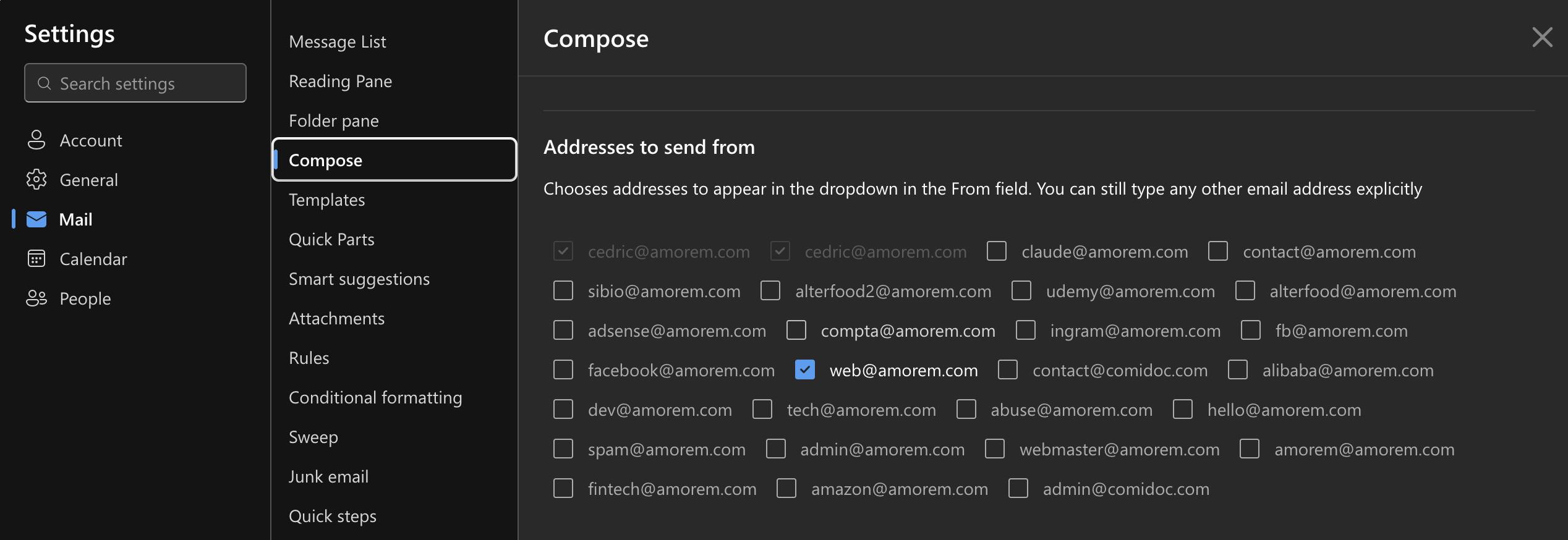
After propagation, Outlook Web lets you choose which aliases to display in the From field.
The behavior wasn't immediate: right after changing the Exchange configuration, typing web@amorem.com in the From field still produced a message sent from cedric@amorem.com. Then the section above appeared and sending from the alias worked.
That's probably the key takeaway if you land on this article after running the right command and feel like it did nothing: first check that SendFromAliasEnabled is indeed True, check that the alias is present in EmailAddresses, then let the change propagate before reconfiguring everything.
Why I didn't just create a second mailbox
For an address like web@amorem.com, creating and maintaining an independent Microsoft 365 mailbox would make no sense. I have several functional addresses that simply need to land in my primary inbox.
Aliases are perfect for that: a single mailbox, a single account, no additional license, and multiple email identities. You just need to know that allowing sending from those identities is a separate setting.
The command to remember
If you already have your Microsoft 365 aliases and your only problem is that Outlook keeps sending your emails from the primary address, start by checking this:
Get-OrganizationConfig | Select-Object SendFromAliasEnabledIf the result is False, enable the feature:
Set-OrganizationConfig -SendFromAliasEnabled $trueIn my case, it was this small Exchange Online setting that finally allowed web@amorem.com to be genuinely used as the sender, and thus to finally respond correctly to the Chrome Web Store verification request.

Comments (0)
> No comments yet.